> For the complete documentation index, see [llms.txt](https://zotek.gitbook.io/facebook-multiple-pixel/llms.txt). Markdown versions of documentation pages are available by appending `.md` to page URLs; this page is available as [Markdown](https://zotek.gitbook.io/facebook-multiple-pixel/getting-started/setup-meta-pixel-guide/connect-meta-pixel-to-zotek-account.md).
# Connect Meta Pixel to Zotek account
In this guide, we'll explain to you how to connect your Zotek's TikTok Pixel and Meta Pixel Feed app to the Meta destination.
With Zotek, you have two methods for pixel installation: *Manual input pixel* and *Auto Input Pixel.*
## **Method 1:** Manual Input Pixel
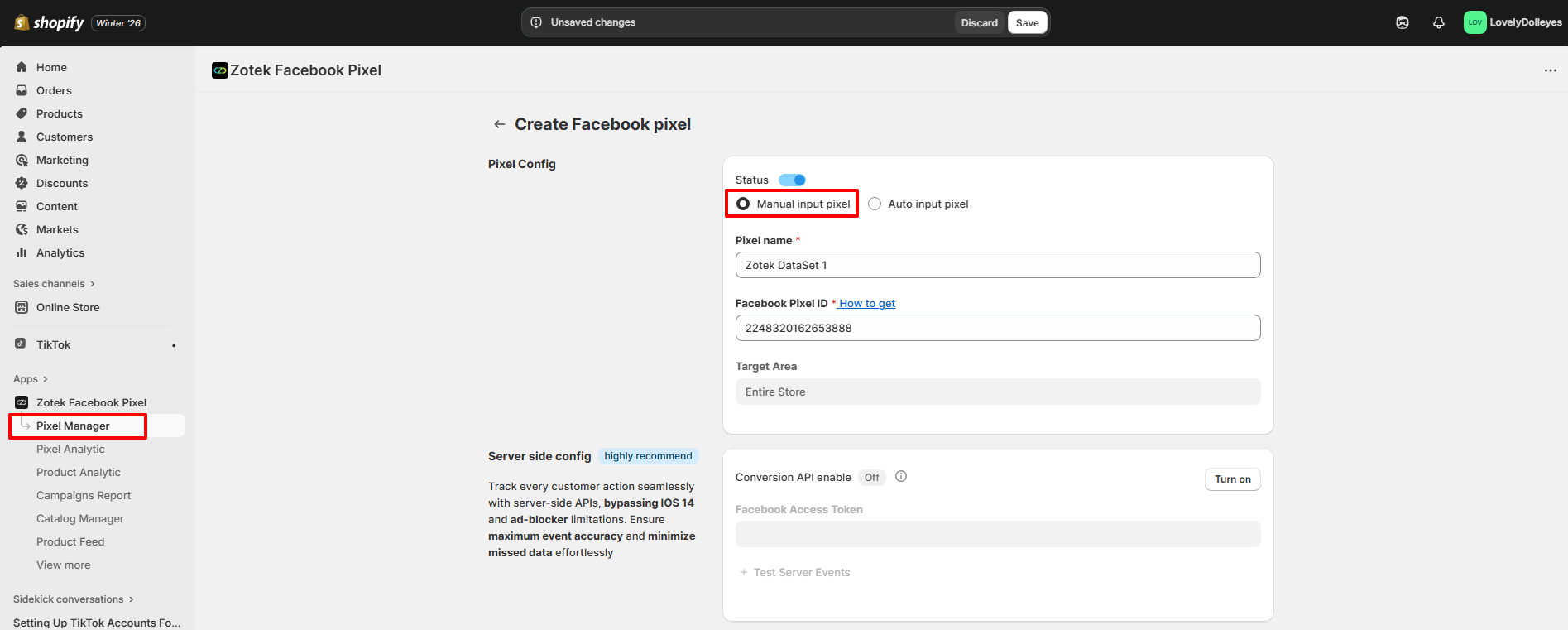
For this approach, copy the Dataset Name and Dataset ID of the datasets you want to use for storing data on your online store. Then, paste them into the corresponding fields on the Zotek creation screen.
From the left sidebar of your ***Shopify Admin*** >> navigate to ***Apps*** section >> ***Zotek Tiktok Pixel & Meta Pixel*** >> then hit ***Pixel Manager***
Paste your ***Pixel name*** and ***Facebook Pixel ID*** into these fields.
## Method 2: Auto Input Pixel
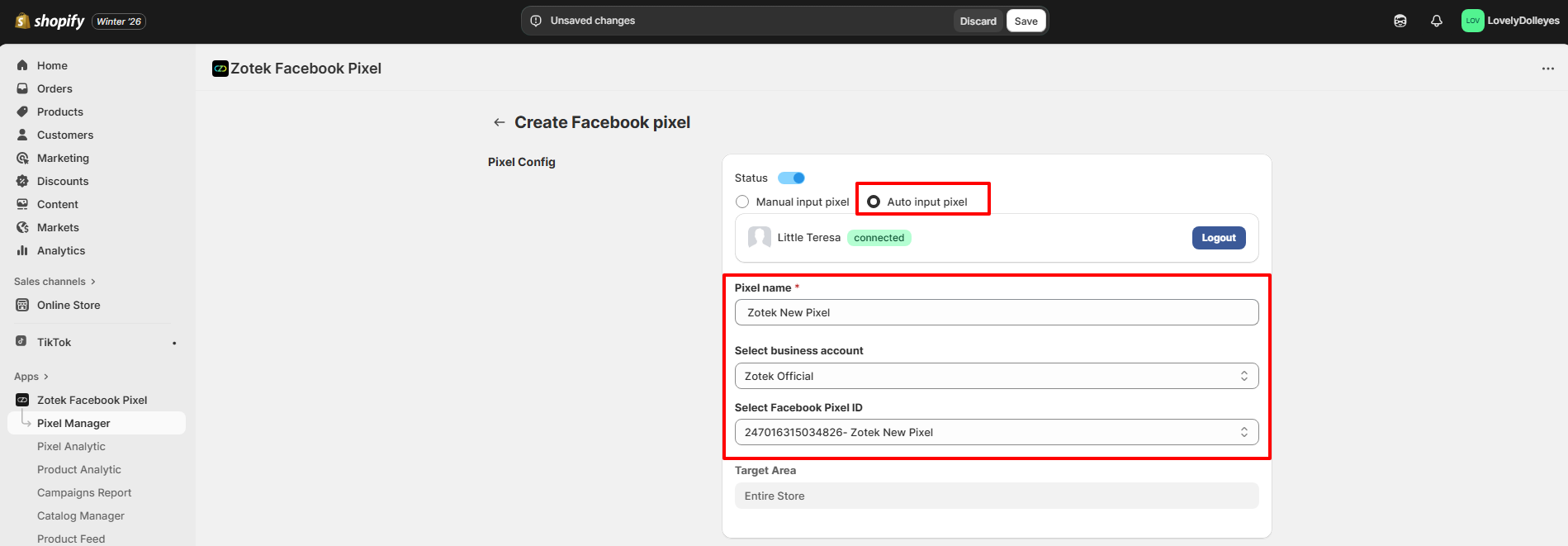
Select ***Auto input pixel***. Fill out your ***Pixel Name*** >> ***Select business account*** >> ***Select Facebook Pixel ID*** in the dropdown effortlessly.
Allow Zotek to connect with your Meta account, enabling us to automatically fill in the necessary information for setting up the pixel on your online store.
***Choose the following options to enhance and customize your data.***
**Target Area**
These are the tracking targets you can aim for. We offer four options:
* **Entire Store:** Monitors events on all pages within your online store
* **Collections:** Tracks actions related to selected collections
* **Products:** Tracks actions related to selected products
* **Countries:** Tracks actions related to selected countries.
**Events**
Zotek assists you in tracking up to 9 different events.
* PageView
* ViewContent
* AddToCart
* InitiateCheckout
* Purchase
* Search
* CollectionView
* AddPaymentInfo
* CartView
[***See this full description of the events.***](https://zotek.gitbook.io/facebook-multiple-pixel/getting-started/how-zotek-works-track-server-side-or-browser-side-data)
> {% hint style="warning" %}
> *Note: For events such as CollectionView, CartView, which do not fall under the standard events provided by Meta, please ensure verification within 30 days from the event's initial receipt. Custom website events not verified by their due date may be discarded and could become unavailable for ad sets, custom conversions, custom audiences, or lift studies*
>
> *Learn more details here:* [*Verify Event*](broken://pages/h4kyLRCUxSyKlVyEaI4y)
> {% endhint %}